

Design your own assets from templates
Turn a proven asset setup into a reusable template, so the next instrument starts from a standard instead of a blank form.
We shipped a template library in Asset Designer. Clone an instrument setup, reshape what you need, and your version lives in the library beside ours.
An instrument configuration defines its features, transfer controls, and issuance metadata. Templates save these choices so later launches can reuse them.
A template carries an instrument's full configuration, so the next launch starts from a proven setup instead of a blank form
Asset Designer is the guided flow where you configure and launch a digital instrument. DALP 3.0 ships twenty-four ready-to-use instrument templates across six asset classes: bonds, equities, funds, real assets, cash instruments, and structured products. Each template carries the full configuration a launch needs: the asset class, the token features, the safe defaults, and the metadata fields to collect at issuance. Your organization's templates sit right beside ours in the same library.
- Templates
- Twenty-four
- Asset classes
- Six
- Standard
- ERC-3643
- Checks
- At design time
Twenty-four templates, ready on day one
DALP 3.0 includes twenty-four instrument templates across six asset classes.
| Asset class | Templates |
|---|---|
| Bonds (fixed income) | Sovereign Bond, Corporate Bond, Treasury Bill, Green Bond, Commercial Paper, Convertible Note, Syndicated Loan |
| Equities | Common Equity, Preferred Equity, Employee Equity Award |
| Funds | ETF, Mutual Fund, Money Market Fund, Private Equity Fund |
| Cash instruments | Certificate of Deposit, Tokenized Bank Deposit, Fiat-Backed Stablecoin |
| Real assets | Commercial Real Estate, Precious Metals, Carbon Credit, Tokenized Art |
| Structured products | Principal-Protected Note, Autocallable Note, Asset-Backed Token |
Each one already carries its asset class, token features, safe defaults, and the metadata fields to collect at issuance. You start from the closest match, never a blank form.
Why every launch used to start from scratch
- Every instrument launch started from a blank form in Asset Designer.
- Which token features to enable, which defaults are safe, which fields a reviewer needs: that knowledge lived in someone's head.
- A new team member setting up a bond had to get it right from memory or ask an expert.
- Each launch was an opportunity to configure something inconsistently.
- Clone the closest template and you start from a saved configuration.
- Token features, safe defaults, and required metadata fields are already set.
- You expose only the parameters an operator should decide at issuance. Everything else is locked in.
- Prerequisite and compatibility checks catch a broken or conflicting setup before anything is created.
From clone to your own standard
The real cost of configuration drift is not that a form gets filled in wrong. The error stays invisible until something downstream breaks. A bond that launches without the right fee configuration and compliance hooks will behave correctly on-chain while producing records that do not match what the servicer expects. Templates encode the decision once, at the point where the product team designed it, and propagate it forward to every subsequent issuance.
- 1Clone
Start from any template in the library, ours or one your organization has already published.
- 2Reshape
Adjust the token features, expose only the fields an operator sets at issuance, and set the defaults that reflect your product.
- 3Launch
Asset Designer runs the same prerequisite and compatibility checks regardless of the source template. A real, fully-configured instrument is created.
- 4Publish
Your version joins the library alongside the standard ones. The next launch starts from your standard, not a blank form.
The standard under every template
Asset Designer uses ERC-3643 interfaces for permissioned instruments: the open Ethereum standard for regulated, permissioned tokens. ERC-3643 extends ERC-20, the foundational fungible-token interface that underpins the on-chain asset economy, by adding the identity verification and programmable compliance rules that ERC-20 alone does not provide. The result is a security that any ERC-20-compatible system can read and hold balances for, while transfer eligibility is governed by on-chain logic rather than off-chain promises.
What ERC-3643 adds over plain ERC-20 is a mandatory identity registry and a modular compliance contract, both linked directly to the token. Before a transfer executes, the standard requires that the recipient address be verified in the registry and that all active rules pass. That check is not a wrapper or a middleware layer: the transfer logic inside the contract enforces it, at the contract level, visible to any party reading the ledger. For digital securities across bonds, equities, funds, and structured products, this makes the permissioned model auditable, deterministic, and portable across custodians, exchanges, and secondary-market venues that support the standard.
The token contracts use OpenZeppelin ERC-20 primitives with DALP identity and compliance controls. The public interfaces let compatible tools read balances and inspect the deployed controls.
Check the requirements of each custody provider or trading venue before connecting the issued token. A shared interface does not by itself establish operational or regulatory compatibility.
The standard library and your own
DALP 3.0 ships a catalog of instrument templates across six asset classes. Each one launches a real, fully-configured product today. Your institution's templates live in the same library, so the next team to issue a commercial paper or a private equity fund sees your organization's standard, not a blank page.
Sovereign Bond · Corporate Bond · Treasury Bill · Green Bond · Commercial Paper · Convertible Note · Syndicated Loan.
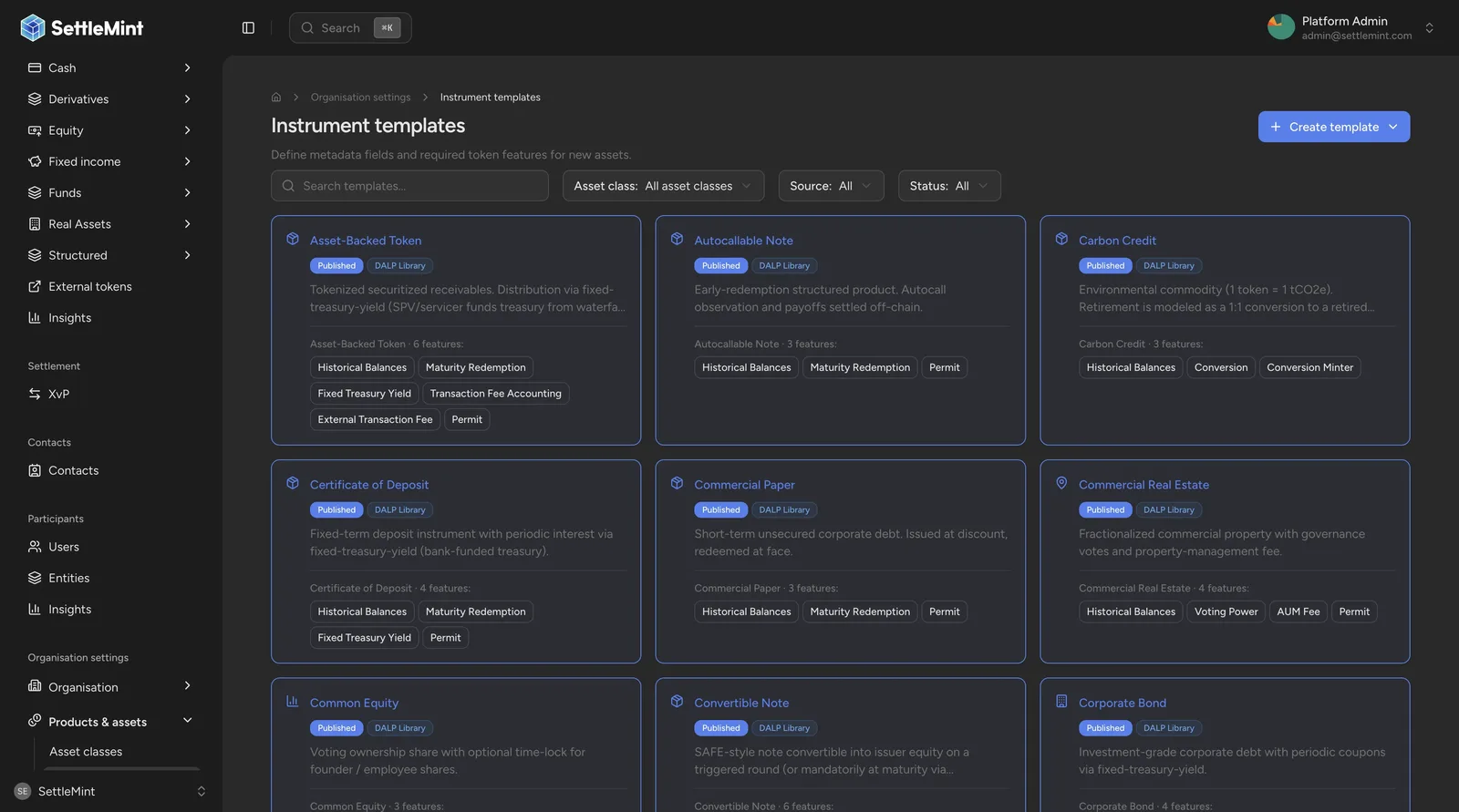
What a template carries
A template records the asset class, features, defaults, and issuance metadata. Review that configuration before using it for a new instrument.
A template captures everything Asset Designer needs to launch a class of asset. The asset class determines which token features are available and which are required. The token features set the exact on-chain capabilities the instrument launches with. Default configuration gives the issuer safe starting values for each parameter they control. Metadata fields define what to collect at issuance, scoped to that instrument class.
When you clone a template and reshape it, all four dimensions travel with your version. The next operator who launches from that template gets your standard, not a blank form.
Configurable feature settings are controlled at the individual setting level. A template can keep a fee recipient fixed while allowing an operator to enter the fee value during asset creation. Settings that are not configurable stay on the template as defaults and do not appear as editable inputs in the Asset Designer. The operator only sees the decisions that are still theirs to make.
Compatibility
Asset templates are new capability in Asset Designer. They change no existing API behavior and deprecate nothing: an instrument already launched from a blank form keeps working exactly as issued, and issuing without a template remains available.
DALP 3.0
Reusable instrument and compliance templates let regulated teams move from policy definition to live instrument without rebuilding from scratch on every launch.
Compliance templates
Package a compliance policy (identity, jurisdictions, supply caps, approvals) once and apply it to every asset in a program, enforced at every transfer.